Table of Contents
- Introduction
- Technology Stack
- Project Structure
- Designing the Microservices
- Middleware Exception Strategy
- Tokenization and Authentication
- Containerizing the Services
- Preparing the Azure Environment
- Creating Azure Container Registry
- Creating Azure Kubernetes Service
- Kubernetes Deployment
- Azure DevOps CI/CD
- Azure Pipeline YAML
- Security Strategy
- Logging and Monitoring
- Deployment Strategy
- Testing Strategy
- Troubleshooting
- Production Checklist
- Conclusion
2. Introduction
Microservices architecture decomposes an application into independently deployable services, with each service responsible for a focused business capability. This approach can improve independent scaling, deployment velocity, resilience, and team autonomy when the system boundaries are designed correctly. Microsoft describes microservices as separately deployable services that communicate through well-defined interfaces.
The architecture becomes particularly powerful in a cloud environment because individual services can be packaged as containers, deployed independently, scaled according to demand, and promoted through automated CI/CD pipelines.
This article demonstrates a representative solution in which an API Gateway communicates with several ASP.NET Core microservices. The services are containerized using Docker and deployed to Azure Kubernetes Service (AKS). Images are stored in Azure Container Registry (ACR), while Azure DevOps Pipelines automate build, test, image creation, and deployment.
The implementation also introduces two cross-cutting concerns that are essential in distributed systems:
- Centralized exception handling through ASP.NET Core middleware.
- Secure token-based authentication and authorization using JWT bearer tokens.
3. Technology Stack
| Component | Technology | Purpose |
|---|---|---|
| Application | ASP.NET Core / .NET | Build RESTful microservices. |
| Authentication | Microsoft Entra ID / JWT | Identity, authentication, and authorization. |
| Containerization | Docker | Package applications consistently. |
| Container Registry | Azure Container Registry | Store and distribute private container images. |
| Orchestration | Azure Kubernetes Service | Run and scale microservices. |
| CI/CD | Azure DevOps Pipelines | Build, test, scan, package, and deploy. |
| Monitoring | Azure Monitor / Application Insights | Metrics, traces, logs, and diagnostics. |
| Secrets | Azure Key Vault | Secure storage of secrets, certificates, and keys. |
Azure DevOps provides integrated source control, CI/CD, and package-management capabilities, while Azure Pipelines supports automated build, test, and deployment workflows.
4. Project Structure
A monorepo can be a good starting point because it simplifies shared tooling, development, and repository management. As the organization grows, services can also be separated into repositories where independent ownership and release processes justify that model.
MicroservicesSolution/
│
├── src/
│   ├── ApiGateway/
│   │   ├── Controllers/
│   │   ├── Middleware/
│   │   ├── Services/
│   │   ├── Program.cs
│   │   └── Dockerfile
│   │
│   ├── ProductService/
│   │   ├── Controllers/
│   │   ├── Application/
│   │   ├── Domain/
│   │   ├── Infrastructure/
│   │   ├── Middleware/
│   │   ├── Program.cs
│   │   └── Dockerfile
│   │
│   ├── OrderService/
│   │   ├── Controllers/
│   │   ├── Application/
│   │   ├── Domain/
│   │   ├── Infrastructure/
│   │   ├── Middleware/
│   │   ├── Program.cs
│   │   └── Dockerfile
│   │
│   └── IdentityService/
│
├── tests/
│   ├── ProductService.UnitTests/
│   ├── OrderService.UnitTests/
│   └── IntegrationTests/
│
├── deploy/
│   ├── kubernetes/
│   │   ├── namespace.yaml
│   │   ├── product-deployment.yaml
│   │   ├── product-service.yaml
│   │   ├── order-deployment.yaml
│   │   └── order-service.yaml
│   │
│   └── helm/
│
├── pipelines/
│   └── azure-pipelines.yml
│
└── README.md
5. Designing the Microservices
The first design task is identifying bounded business capabilities rather than technical layers. For example, an e-commerce platform could contain Product, Order, Customer, Payment, Inventory, and Notification services.
5.1 Product Service
[ApiController]
[Route("api/products")]
public class ProductsController : ControllerBase
{
    private readonly IProductService _service;

    public ProductsController(IProductService service)
    {
        _service = service;
    }

    [HttpGet("{id:guid}")]
    public async Task Get(Guid id)
    {
        var product = await _service.GetAsync(id);

        if (product is null)
            return NotFound();

        return Ok(product);
    }
}
5.2 Order Service
[ApiController]
[Route("api/orders")]
[Authorize]
public class OrdersController : ControllerBase
{
    private readonly IOrderService _service;

    public OrdersController(IOrderService service)
    {
        _service = service;
    }

    [HttpPost]
    public async Task Create(CreateOrderRequest request)
    {
        var customerId = User.FindFirst("sub")?.Value;

        if (string.IsNullOrWhiteSpace(customerId))
            return Unauthorized();

        var order = await _service.CreateAsync(customerId, request);

        return CreatedAtAction(
            nameof(Get),
            new { id = order.Id },
            order);
    }

    [HttpGet("{id:guid}")]
    public async Task Get(Guid id)
    {
        var order = await _service.GetAsync(id);

        if (order is null)
            return NotFound();

        return Ok(order);
    }
}
5.3 Database-per-Service Principle
A strong microservices boundary normally means that a service owns its persistence model. The Order Service should not directly query the Product Service's database. Instead, services communicate through APIs or messaging.
6. Middleware Exception Strategy
Exceptions should not be handled independently inside every controller. Doing so produces duplicated code and inconsistent HTTP responses. ASP.NET Core provides middleware specifically suited to centralizing exception processing. In production, Microsoft's guidance recommends exception-handler middleware rather than exposing developer exception details.
6.1 Why Middleware?
Middleware executes as part of the HTTP request pipeline. An exception middleware placed early in that pipeline can catch exceptions produced by downstream middleware and application components.
The general pipeline should look like:
HTTP Request
     |
     v
Exception Middleware
     |
     v
Correlation Middleware
     |
     v
Authentication
     |
     v
Authorization
     |
     v
Routing
     |
     v
Controller / Endpoint
     |
     v
Application Service
     |
     v
Repository / External Service
6.2 Custom Exception Types
public class NotFoundException : Exception
{
    public NotFoundException(string message)
        : base(message)
    {
    }
}

public class BusinessException : Exception
{
    public BusinessException(string message)
        : base(message)
    {
    }
}

public class ValidationException : Exception
{
    public ValidationException(string message)
        : base(message)
    {
    }
}
6.3 Exception Middleware
public sealed class ExceptionHandlingMiddleware
{
    private readonly RequestDelegate _next;
    private readonly ILogger<ExceptionHandlingMiddleware> _logger;

    public ExceptionHandlingMiddleware(
        RequestDelegate next,
        ILogger<ExceptionHandlingMiddleware> logger)
    {
        _next = next;
        _logger = logger;
    }

    public async Task InvokeAsync(HttpContext context)
    {
        try
        {
            await _next(context);
        }
        catch (Exception exception)
        {
            await HandleExceptionAsync(context, exception);
        }
    }

    private async Task HandleExceptionAsync(
        HttpContext context,
        Exception exception)
    {
        var traceId = context.TraceIdentifier;

        _logger.LogError(
            exception,
            "Unhandled exception. TraceId: {TraceId}",
            traceId);

        var statusCode = exception switch
        {
            ValidationException => StatusCodes.Status400BadRequest,
            BusinessException => StatusCodes.Status422UnprocessableEntity,
            NotFoundException => StatusCodes.Status404NotFound,
            UnauthorizedAccessException => StatusCodes.Status401Unauthorized,
            _ => StatusCodes.Status500InternalServerError
        };

        context.Response.StatusCode = statusCode;
        context.Response.ContentType = "application/problem+json";

        var response = new
        {
            type = "https://httpstatuses.com/" + statusCode,
            title = GetTitle(statusCode),
            status = statusCode,
            traceId = traceId
        };

        await context.Response.WriteAsJsonAsync(response);
    }

    private static string GetTitle(int statusCode)
    {
        return statusCode switch
        {
            400 => "Validation error",
            401 => "Unauthorized",
            404 => "Resource not found",
            422 => "Business rule violation",
            _ => "An unexpected error occurred"
        };
    }
}
6.4 Registering the Middleware
var builder = WebApplication.CreateBuilder(args);

builder.Services.AddControllers();

var app = builder.Build();

app.UseMiddleware<ExceptionHandlingMiddleware>();

app.UseHttpsRedirection();

app.UseAuthentication();
app.UseAuthorization();

app.MapControllers();

app.Run();
Exception middleware should be positioned early enough to observe failures
from subsequent components. ASP.NET Core's built-in
UseExceptionHandler follows the same general principle:
exceptions thrown by later middleware can be intercepted and converted into
an appropriate error response.
6.5 Recommended Error Response
{
    "type": "https://httpstatuses.com/404",
    "title": "Resource not found",
    "status": 404,
    "traceId": "00-5f3..."
}7. Tokenization and Authentication Strategy
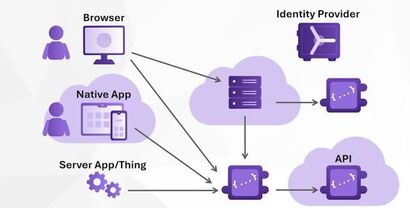
In a microservices environment, authentication should be centralized while authorization remains explicit at each protected API boundary. A common implementation is OAuth 2.0/OpenID Connect with Microsoft Entra ID issuing access tokens containing claims that downstream APIs validate.
It is important to distinguish authentication tokens from data tokenization. A JWT access token represents identity and authorization claims; it is not a substitute for protecting sensitive business data. If an application stores payment or other highly sensitive information, a separate data-tokenization strategy may be required.
7.1 JWT Bearer Authentication
var builder = WebApplication.CreateBuilder(args);

builder.Services
    .AddAuthentication("Bearer")
    .AddJwtBearer("Bearer", options =>
    {
        options.Authority =
            builder.Configuration["Authentication:Authority"];

        options.Audience =
            builder.Configuration["Authentication:Audience"];

        options.RequireHttpsMetadata = true;
    });

builder.Services.AddAuthorization();

var app = builder.Build();

app.UseMiddleware<ExceptionHandlingMiddleware>();

app.UseHttpsRedirection();

app.UseAuthentication();
app.UseAuthorization();

app.MapControllers();

app.Run();
7.2 Example Configuration
{
    "Authentication": {
        "Authority": "https://login.microsoftonline.com/<tenant-id>/v2.0",
        "Audience": "api://microservices-api"
    }
}
In production, environment-specific authentication configuration should not be committed as secrets to source control. Use a secure configuration mechanism such as Azure Key Vault or managed identity where appropriate.
7.3 Authorization Policies
builder.Services.AddAuthorization(options =>
{
    options.AddPolicy("Orders.Read", policy =>
    {
        policy.RequireAuthenticatedUser();
        policy.RequireClaim("scp", "orders.read");
    });

    options.AddPolicy("Orders.Write", policy =>
    {
        policy.RequireAuthenticatedUser();
        policy.RequireClaim("scp", "orders.write");
    });
});
Controllers can then apply explicit policies:
[Authorize(Policy = "Orders.Write")]
[HttpPost]
public async Task Create(CreateOrderRequest request)
{
    // Create order
}
7.4 Token Security Rules
- Always require HTTPS.
- Keep access tokens short-lived.
- Never write access tokens to application logs.
- Do not put access tokens in URLs.
- Validate issuer, audience, signature, and expiration.
- Use scopes or roles for authorization.
- Do not treat a decoded JWT as proof of authenticity; validate its signature.
- Use managed identity or workload identity for service-to-service Azure access where possible.
8. Containerizing the Services
Each microservice should produce its own container image. This creates a consistent deployment artifact that can be tested in CI and promoted across environments.
8.1 Product Service Dockerfile
FROM mcr.microsoft.com/dotnet/sdk:10.0 AS build
WORKDIR /src

COPY ["ProductService/ProductService.csproj",
      "ProductService/"]

RUN dotnet restore "ProductService/ProductService.csproj"

COPY . .

WORKDIR "/src/ProductService"

RUN dotnet publish \
    "ProductService.csproj" \
    -c Release \
    -o /app/publish \
    /p:UseAppHost=false

FROM mcr.microsoft.com/dotnet/aspnet:10.0 AS runtime
WORKDIR /app

COPY --from=build /app/publish .

EXPOSE 8080

ENTRYPOINT ["dotnet", "ProductService.dll"]
8.2 Build and Run Locally
docker build \
    -t product-service:1.0.0 \
    -f src/ProductService/Dockerfile .

docker run \
    -p 8080:8080 \
    product-service:1.0.0
Before pushing an image to Azure, test it locally and run automated vulnerability scanning as part of the CI process.
9. Preparing the Azure Environment
The Azure resources used in this reference architecture are:
- Resource Group
- Azure Container Registry
- Azure Kubernetes Service
- Microsoft Entra ID
- Azure Key Vault
- Azure Monitor / Application Insights
- Optional Azure Application Gateway or another ingress solution
9.1 Create a Resource Group
az login

az group create \
    --name rg-microservices-prod \
    --location westeurope
Select the Azure region based on latency, compliance, availability, service availability, and data-residency requirements rather than copying the example region blindly.
10. Creating Azure Container Registry
az acr create \
    --resource-group rg-microservices-prod \
    --name acrmicroservicesprod \
    --sku Premium
Authenticate Docker against the registry:
az acr login --name acrmicroservicesprodTag the image:
docker tag product-service:1.0.0 \
    acrmicroservicesprod.azurecr.io/product-service:1.0.0
Push it:
docker push \
    acrmicroservicesprod.azurecr.io/product-service:1.0.0
In a production pipeline, use immutable image tags such as a Git commit
SHA instead of repeatedly overwriting a generic latest tag.
This makes rollback and auditability significantly easier.
11. Creating Azure Kubernetes Service
az aks create \
    --resource-group rg-microservices-prod \
    --name aks-microservices-prod \
    --node-count 3 \
    --enable-managed-identity \
    --generate-ssh-keys
Connect kubectl to the cluster:
az aks get-credentials \
    --resource-group rg-microservices-prod \
    --name aks-microservices-prod

kubectl get nodes12. Kubernetes Deployment
12.1 Namespace
apiVersion: v1
kind: Namespace
metadata:
  name: microservices
12.2 Product Deployment
apiVersion: apps/v1
kind: Deployment
metadata:
  name: product-service
  namespace: microservices
spec:
  replicas: 2

  selector:
    matchLabels:
      app: product-service

  template:
    metadata:
      labels:
        app: product-service

    spec:
      containers:
        - name: product-service
          image: acrmicroservicesprod.azurecr.io/product-service:1.0.0

          ports:
            - containerPort: 8080

          resources:
            requests:
              cpu: "100m"
              memory: "128Mi"
            limits:
              cpu: "500m"
              memory: "512Mi"

          readinessProbe:
            httpGet:
              path: /health/ready
              port: 8080
            initialDelaySeconds: 10
            periodSeconds: 10

          livenessProbe:
            httpGet:
              path: /health/live
              port: 8080
            initialDelaySeconds: 30
            periodSeconds: 20
12.3 Kubernetes Service
apiVersion: v1
kind: Service
metadata:
  name: product-service
  namespace: microservices

spec:
  selector:
    app: product-service

  ports:
    - port: 80
      targetPort: 8080

  type: ClusterIP
12.4 Apply the Configuration
kubectl apply -f deploy/kubernetes/namespace.yaml

kubectl apply \
    -f deploy/kubernetes/product-deployment.yaml

kubectl apply \
    -f deploy/kubernetes/product-service.yaml
Verify the deployment:
kubectl get deployments -n microservices
kubectl get pods -n microservices
kubectl get services -n microservices
13. Azure DevOps CI/CD
CI/CD is particularly important for microservices because the architecture creates more independently deployable artifacts. Microsoft's guidance emphasizes independent service deployment, automated validation, quality gates, and the ability to deploy a new service version alongside an existing version.
A practical pipeline should perform:
- Source checkout.
- Dependency restore.
- Compilation.
- Unit tests.
- Integration tests.
- Static analysis.
- Security and dependency scanning.
- Docker image build.
- Container image scanning.
- Push image to ACR.
- Deploy to development.
- Run smoke tests.
- Promote to staging.
- Require approval where appropriate.
- Deploy to production.
13.1 Recommended Pipeline Flow
Developer Commit
       |
       v
Pull Request
       |
       v
    Build
       |
       v
Unit Tests
       |
       v
Security Scan
       |
       v
Docker Build
       |
       v
Container Scan
       |
       v
Push to ACR
       |
       v
Deploy DEV
       |
       v
Integration / Smoke Tests
       |
       v
Deploy STAGING
       |
       v
Approval / Quality Gate
       |
       v
Deploy PRODUCTION
       |
       v
    Monitor
       |
       v
Rollback if required
14. Azure Pipeline YAML
The following example illustrates a simplified Azure DevOps pipeline. Production implementations should add environment approvals, security scanning, test reporting, deployment strategies, and organization-specific governance.
trigger:
  branches:
    include:
      - main

pool:
  vmImage: ubuntu-latest

variables:
  buildConfiguration: Release
  serviceName: product-service
  acrName: acrmicroservicesprod
  imageRepository: product-service
  tag: $(Build.SourceVersion)

stages:

# ---------------------------------------------
# BUILD AND TEST
# ---------------------------------------------
- stage: Build
  displayName: Build and Test

  jobs:
  - job: BuildAndTest

    steps:
    - checkout: self

    - task: UseDotNet@2
      displayName: Install .NET SDK
      inputs:
        packageType: sdk
        version: '10.x'

    - script: |
        dotnet restore
      displayName: Restore dependencies

    - script: |
        dotnet build \
          --configuration $(buildConfiguration) \
          --no-restore
      displayName: Build solution

    - script: |
        dotnet test \
          --configuration $(buildConfiguration) \
          --no-build \
          --logger trx
      displayName: Run tests

    - task: PublishTestResults@2
      displayName: Publish test results
      condition: succeededOrFailed()
      inputs:
        testResultsFormat: VSTest
        testResultsFiles: '**/*.trx'

# ---------------------------------------------
# CONTAINER BUILD
# ---------------------------------------------
- stage: Container
  displayName: Build Container
  dependsOn: Build
  condition: succeeded()

  jobs:
  - job: BuildContainer

    steps:
    - task: Docker@2
      displayName: Build and Push Container
      inputs:
        containerRegistry: AzureContainerRegistryConnection
        repository: $(imageRepository)
        command: buildAndPush
        Dockerfile: src/ProductService/Dockerfile
        tags: |
          $(tag)

# ---------------------------------------------
# DEPLOY DEVELOPMENT
# ---------------------------------------------
- stage: DeployDev
  displayName: Deploy Development
  dependsOn: Container
  condition: succeeded()

  jobs:
  - deployment: Deploy
    environment: development

    strategy:
      runOnce:
        deploy:
          steps:

          - task: KubernetesManifest@1
            displayName: Deploy to AKS
            inputs:
              action: deploy
              kubernetesServiceConnection: AKS-Development
              namespace: microservices
              manifests: |
                deploy/kubernetes/product-deployment.yaml
                deploy/kubernetes/product-service.yaml
              containers: |
                acrmicroservicesprod.azurecr.io/product-service:$(tag)
Azure Pipelines supports CI/CD workflows for applications across different languages and platforms.
14.1 Service Connections
Configure secure Azure DevOps service connections rather than embedding Azure credentials directly inside YAML.
Typical connections include:
- Azure Resource Manager connection.
- Azure Container Registry connection.
- AKS/Kubernetes connection where required.
Prefer workload identity federation or other short-lived authentication mechanisms where supported rather than long-lived secrets.
15. Security Strategy
15.1 Identity
- Use Microsoft Entra ID for centralized identity.
- Use OAuth 2.0/OpenID Connect for user-facing authentication.
- Validate JWTs at protected API boundaries.
- Use scopes and roles for authorization.
- Use managed/workload identity for Azure resources where possible.
15.2 Secrets
Secrets should never be committed to Git.
# Never do this

ConnectionStrings__Database=Server=...;Password=SuperSecret123
Instead, use Azure Key Vault and an identity-based access mechanism.
15.3 Container Security
- Use minimal runtime images.
- Run containers as non-root where possible.
- Scan dependencies.
- Scan container images.
- Keep base images patched.
- Generate and retain software bills of materials where required.
- Use immutable image tags.
- Do not place secrets inside Docker images.
Microsoft recommends securing container delivery with practices such as image signing, software-bill-of-materials attestations, and vulnerability scanning as appropriate to the environment.
15.4 Network Security
- Use HTTPS externally.
- Restrict internal service access.
- Use Kubernetes NetworkPolicies where appropriate.
- Consider private AKS and private endpoints for sensitive environments.
- Use an ingress controller or Application Gateway for controlled external access.
16. Logging, Monitoring, and Distributed Tracing
A distributed system without observability is difficult to operate. A request can travel through an API Gateway, several microservices, databases, and external APIs. A single application log is rarely sufficient to identify the actual failure.
16.1 Structured Logging
logger.LogInformation(
    "Creating order {OrderId} for customer {CustomerId}",
    orderId,
    customerId);
Avoid logging sensitive information such as passwords, access tokens, payment credentials, or confidential personal information.
16.2 Correlation ID Middleware
public sealed class CorrelationIdMiddleware
{
    private readonly RequestDelegate _next;

    public CorrelationIdMiddleware(RequestDelegate next)
    {
        _next = next;
    }

    public async Task InvokeAsync(HttpContext context)
    {
        const string headerName = "X-Correlation-ID";

        var correlationId =
            context.Request.Headers[headerName].FirstOrDefault()
            ?? Guid.NewGuid().ToString();

        context.Response.Headers[headerName] = correlationId;

        using (context.RequestServices
            .GetRequiredService<ILoggerFactory>()
            .CreateLogger("Correlation")
            .BeginScope(new Dictionary<string, object>
            {
                ["CorrelationId"] = correlationId
            }))
        {
            await _next(context);
        }
    }
}
16.3 Health Checks
builder.Services.AddHealthChecks();

var app = builder.Build();

app.MapHealthChecks("/health/live");
app.MapHealthChecks("/health/ready");
Kubernetes can use these endpoints to determine whether a container should receive traffic and whether it needs to be restarted.
16.4 Continuous Monitoring
DevOps does not end when deployment completes. Continuous monitoring should cover application health, infrastructure, performance, failures, and customer-impacting behavior. Microsoft identifies continuous monitoring as a core DevOps practice.
Useful metrics include:
- Request rate.
- HTTP 4xx and 5xx rates.
- Request latency.
- CPU and memory utilization.
- Pod restart count.
- Database latency.
- Queue depth.
- Dependency failures.
- Authentication failures.
17. Deployment Strategies
17.1 Rolling Deployment
Kubernetes can replace old instances gradually with new ones. This is appropriate for many routine service updates.
17.2 Blue-Green Deployment
Run the existing and new versions simultaneously, validate the new version, and then switch traffic.
17.3 Canary Deployment
Send a small percentage of traffic to the new version first. If health and business metrics remain acceptable, gradually increase traffic.
Microsoft identifies rolling, blue-green, and canary approaches as common strategies for updating services in a microservices environment.
18. Testing Strategy
Microservices require testing at several levels because failures can occur both inside a service and between services.
| Test | Purpose |
|---|---|
| Unit Tests | Validate individual business components. |
| Integration Tests | Validate service/database interactions. |
| Contract Tests | Ensure service APIs remain compatible. |
| API Tests | Validate HTTP behavior, authentication, and authorization. |
| End-to-End Tests | Validate critical business journeys. |
| Load Tests | Determine behavior under expected and peak load. |
| Security Tests | Identify vulnerabilities and configuration weaknesses. |
18.1 Test the Exception Middleware
[Fact]
public async Task UnknownException_Returns500()
{
    var response = await TestClient.GetAsync(
        "/api/test/throw");

    Assert.Equal(
        HttpStatusCode.InternalServerError,
        response.StatusCode);
}
18.2 Test Authentication
- Missing token returns 401.
- Invalid token returns 401.
- Expired token returns 401.
- Valid token without required scope returns 403.
- Valid token with the correct scope succeeds.
19. Troubleshooting Common Deployment Problems
Problem: Pod is stuck in ImagePullBackOff
kubectl describe pod <pod-name> -n microservicesCheck:
- Image name.
- Image tag.
- ACR permissions.
- AKS-to-ACR integration.
- Registry availability.
Problem: Pod repeatedly restarts
kubectl logs <pod-name> -n microservices

kubectl describe pod <pod-name> -n microservices
Common causes include configuration errors, failed health checks, unavailable dependencies, incorrect connection strings, or application startup exceptions.
Problem: API returns 401
Check:
- JWT issuer.
- Audience.
- Signing keys.
- Token expiration.
- HTTPS configuration.
- Authorization header.
Authorization: Bearer eyJ...Problem: API returns 403
A 403 generally means the caller was authenticated but did not satisfy the authorization policy. Inspect the scopes, roles, and claims expected by the API.
Problem: Changes are deployed to the wrong version
Avoid mutable image tags such as latest for production.
Use a unique Git commit SHA or release version:
product-service:8c3e2d1
product-service:2026.08.28.15
20. Production Readiness Checklist
- Every service has a clearly defined business responsibility.
- Services can be deployed independently.
- Each service owns its persistence boundary.
- APIs are versioned where compatibility requires it.
- HTTPS is enforced.
- Authentication is centralized and authorization is enforced at APIs.
- JWT issuer and audience validation are enabled.
- Access tokens are not written to logs.
- Secrets are stored outside source control.
- Azure Key Vault or equivalent secret management is configured.
- Managed/workload identities are used where appropriate.
- Docker images are scanned.
- Dependency vulnerabilities are scanned.
- Images use immutable version tags.
- Kubernetes readiness probes are configured.
- Kubernetes liveness probes are configured.
- CPU and memory requests/limits are defined.
- Autoscaling requirements have been evaluated.
- Centralized exception middleware is implemented.
- Production error responses do not expose internal details.
- Correlation IDs are available.
- Centralized logging is configured.
- Application and infrastructure monitoring is configured.
- CI executes automated tests.
- CD deploys through controlled environments.
- Production deployments have appropriate approval gates.
- Rollback procedures have been tested.
- Database migration strategy is defined.
- Disaster recovery and backup requirements are defined.
- Security and compliance requirements are documented.
21. Final Thoughts @ Techm Studios R&D Series Desk
Building a microservices application is more than splitting a monolithic application into multiple projects. A successful implementation requires clear domain boundaries, independently deployable services, reliable communication patterns, automated testing, secure authentication, centralized exception handling, containerization, observability, and a disciplined deployment process.
Azure provides the infrastructure required to implement this model at scale. A representative implementation can use ASP.NET Core for the services, Docker for packaging, Azure Container Registry for image storage, AKS for orchestration, Azure DevOps for CI/CD, Microsoft Entra ID for identity, Azure Key Vault for secrets, and Azure Monitor for operational visibility.
The middleware exception strategy ensures that errors are handled consistently across services instead of being duplicated throughout controllers. A token-based security strategy protects APIs while allowing services to make authorization decisions based on validated identity claims.
The DevOps pipeline then connects development to production by automatically compiling code, executing tests, building immutable container images, publishing them to ACR, deploying them to AKS, validating the deployment, and promoting approved versions through environments.
The most important principle is to treat the platform as a complete system: architecture, source control, testing, security, deployment, monitoring, and recovery must work together. Microsoft's Azure architecture guidance similarly emphasizes CI/CD, continuous monitoring, independent service deployment, and appropriate deployment strategies as important parts of operating microservices successfully.
22. References
- Microsoft Learn — Azure Microservices Architecture and Design
- Microsoft Learn — CI/CD for Microservices
- Microsoft Learn — ASP.NET Core Middleware
- Microsoft Learn — Handle Errors in ASP.NET Core APIs
- Microsoft Learn — Azure DevOps Architecture
- Microsoft Learn — Azure Pipelines Documentation
- Microsoft Learn — CI/CD Baseline Architecture with Azure Pipelines