What Hangfire is and when to use it
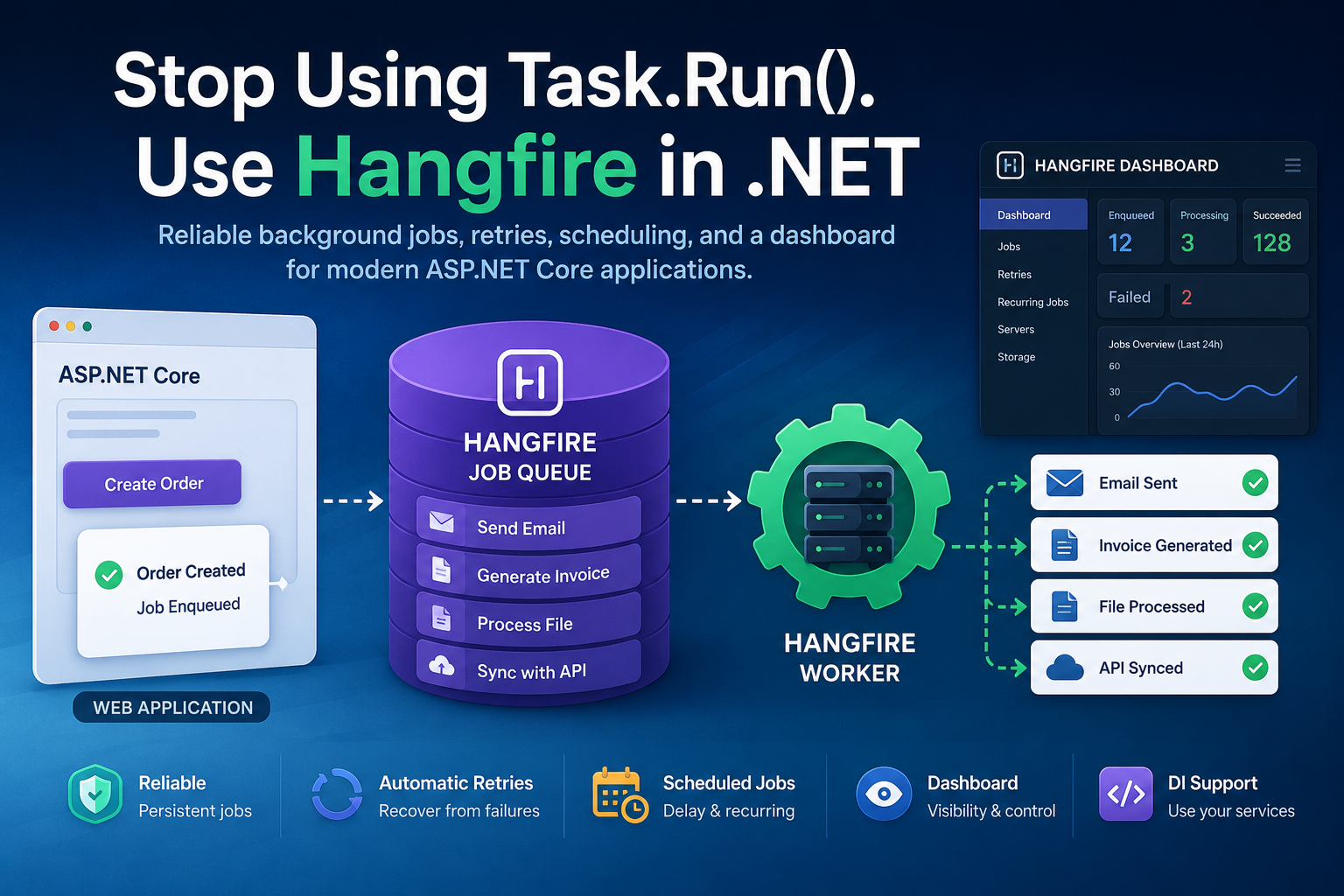
Hangfire is an open-source background job framework for .NET, licensed under LGPL v3. Jobs are persisted in storage (SQL Server by default), so they survive app restarts and can be processed by any server connected to the same database. Use it for sending emails, generating reports, calling slow third-party APIs, nightly cleanups and anything else that should not block an HTTP request.
It is not a full message bus. If you need cross-service messaging, pub/sub or strict ordering guarantees, look at MassTransit or a broker such as RabbitMQ. For "run this code later, reliably, and show me what happened," Hangfire is hard to beat.
Install and configure Hangfire in ASP.NET Core
1. Create the project and add packages
dotnet new web -n HangfireDemo
cd HangfireDemo
dotnet add package Hangfire --version 1.8.24
The Hangfire meta package pulls in Hangfire.Core, Hangfire.AspNetCore and Hangfire.SqlServer. Check NuGet for a newer patch before you install.
2. Add a connection string
Create the (empty) database first. Hangfire creates its own tables on startup.
{
  "ConnectionStrings": {
    "HangfireConnection": "Server=(localdb)\\MSSQLLocalDB;Database=HangfireDemo;Integrated Security=true;TrustServerCertificate=True"
  }
}
3. Register Hangfire in Program.cs
using Hangfire;
using Hangfire.SqlServer;

var builder = WebApplication.CreateBuilder(args);

builder.Services.AddHangfire(config => config
    .SetDataCompatibilityLevel(CompatibilityLevel.Version_180)
    .UseSimpleAssemblyNameTypeSerializer()
    .UseRecommendedSerializerSettings()
    .UseSqlServerStorage(
        builder.Configuration.GetConnectionString("HangfireConnection"),
        new SqlServerStorageOptions
        {
            CommandBatchMaxTimeout       = TimeSpan.FromMinutes(5),
            SlidingInvisibilityTimeout   = TimeSpan.FromMinutes(5),
            QueuePollInterval            = TimeSpan.Zero,
            UseRecommendedIsolationLevel = true,
            DisableGlobalLocks           = true
        }));

// Runs the processing server inside this app
builder.Services.AddHangfireServer();

var app = builder.Build();

app.UseHangfireDashboard("/hangfire");   // secure this before production
app.MapGet("/", () => "Hangfire is running");

app.Run();
Run the app and open /hangfire. You should see the dashboard with one active server. The dashboard is restricted to local requests by default, which is why you must add authorization before deploying (see below).
Tip for local development: add the Hangfire.InMemory package and call .UseInMemoryStorage() instead of SQL Server. Jobs vanish on restart, so never use it in production.
Job types and the core API
You create jobs with the static BackgroundJob class or, preferably, the injectable IBackgroundJobClient. Both take an expression tree, so Hangfire records the method, its type and the serialized arguments.
Fire-and-forget jobs
Executed once, as soon as a worker is free.
app.MapPost("/welcome/{userId:int}", (int userId, IBackgroundJobClient jobs) =>
{
    string jobId = jobs.Enqueue<IEmailJobs>(x => x.SendWelcomeAsync(userId, CancellationToken.None));
    return Results.Accepted(value: new { jobId });
});
Delayed jobs
jobs.Schedule<IEmailJobs>(x => x.SendReminderAsync(userId, CancellationToken.None),
                         TimeSpan.FromHours(24));
Continuations
Run a job after its parent finishes successfully.
var parent = jobs.Enqueue<IReportJobs>(x => x.BuildAsync(reportId, CancellationToken.None));
jobs.ContinueJobWith<IEmailJobs>(parent, x => x.SendReportAsync(reportId, CancellationToken.None));
Managing existing jobs
jobs.Delete(jobId);    // remove a job
jobs.Requeue(jobId);   // run it again
Batches and batch continuations are part of the commercial Hangfire Pro package, not the open-source core.
Method arguments: keep them small
Arguments are serialized to JSON and stored. Pass IDs, not entities or large payloads, and load fresh data inside the job. Add a CancellationToken parameter and Hangfire supplies a real token that fires on shutdown or when the job is deleted.
Dependency Injection in Jobs
Hangfire.AspNetCore resolves job classes from your service provider and creates a scope per job, so scoped services such as DbContext work as expected.
public interface IEmailJobs
{
    Task SendWelcomeAsync(int userId, CancellationToken ct);
    Task SendReminderAsync(int userId, CancellationToken ct);
    Task SendReportAsync(int reportId, CancellationToken ct);
}

public class EmailJobs(AppDbContext db, IEmailSender sender, ILogger<EmailJobs> log) : IEmailJobs
{
    public async Task SendWelcomeAsync(int userId, CancellationToken ct)
    {
        var user = await db.Users.FindAsync([userId], ct);
        if (user is null) return;                 // idempotent: nothing to do
        await sender.SendAsync(user.Email, "Welcome!", ct);
        log.LogInformation("Welcome email sent to user {UserId}", userId);
    }
    // ...other methods
}

// Program.cs
builder.Services.AddScoped<IEmailJobs, EmailJobs>();
Recurring jobs
Recurring jobs use CRON expressions and are identified by a unique ID. Calling AddOrUpdate on every startup is safe: it updates the schedule if the ID already exists.
var recurring = app.Services.GetRequiredService<IRecurringJobManager>();

recurring.AddOrUpdate<IReportJobs>(
    "daily-sales-report",
    x => x.BuildDailyAsync(CancellationToken.None),
    Cron.Daily(hour: 2, minute: 30),
    new RecurringJobOptions { TimeZone = TimeZoneInfo.FindSystemTimeZoneById("Africa/Johannesburg") });

recurring.AddOrUpdate<ICleanupJobs>(
    "purge-expired-tokens",
    x => x.PurgeAsync(CancellationToken.None),
    "*/15 * * * *");                 // every 15 minutes

recurring.TriggerJob("daily-sales-report");      // run now
recurring.RemoveIfExists("purge-expired-tokens");
Hangfire runs recurring jobs in UTC unless you set TimeZone. Use IANA IDs on Linux and containers, and remember that daylight-saving changes can shift local-time schedules.
Retries, queues and filters
Failed jobs are retried automatically, ten times by default with increasing delays. Attributes on the job method or class change that behaviour.
[AutomaticRetry(Attempts = 5, DelaysInSeconds = new[] { 10, 60, 300 },
                OnAttemptsExceeded = AttemptsExceededAction.Delete,
                ExceptOn = new[] { typeof(ValidationException) })]  // ExceptOn: 1.8.15+
[DisableConcurrentExecution(timeoutInSeconds: 60)]
[Queue("critical")]
[JobDisplayName("Build report {0}")]
public Task BuildAsync(int reportId, CancellationToken ct) { /* ... */ }
Queue names must be lowercase letters, digits, underscores or dashes. A server only processes the queues listed in its options, in priority order (see next section).
Writing a custom filter
public class LogFailuresAttribute : JobFilterAttribute, IElectStateFilter
{
    public void OnStateElection(ElectStateContext context)
    {
        if (context.CandidateState is FailedState failed)
            Console.Error.WriteLine($"Job {context.BackgroundJob.Id} failed: {failed.Exception.Message}");
    }
}

GlobalJobFilters.Filters.Add(new LogFailuresAttribute());
Securing the Hangfire dashboard
The dashboard can delete, requeue and trigger jobs, so treat it like an admin page.
public class AdminOnlyDashboardFilter : IDashboardAuthorizationFilter
{
    public bool Authorize(DashboardContext context)
    {
        var http = context.GetHttpContext();
        return http.User.Identity?.IsAuthenticated == true && http.User.IsInRole("Admin");
    }
}

app.UseHangfireDashboard("/hangfire", new DashboardOptions
{
    Authorization = new[] { new AdminOnlyDashboardFilter() },
    DashboardTitle = "Background jobs"
});
Alternatively, use endpoint routing so ASP.NET Core policies apply:
app.MapHangfireDashboardWithNoAuthorizationFilters("/hangfire")
   .RequireAuthorization("HangfireAdmins");
That method was added in 1.8.22 and skips Hangfire's own local-only filter, so pair it with a real authorization policy as shown.
Server and storage tuning
builder.Services.AddHangfireServer(options =>
{
    options.ServerName  = $"{Environment.MachineName}:web";
    options.WorkerCount = Math.Min(Environment.ProcessorCount * 5, 20);
    options.Queues      = new[] { "critical", "default" };   // priority order
});| Storage | Package | Notes |
|---|---|---|
| SQL Server | Hangfire.SqlServer | Official, default choice, auto-creates schema |
| In-memory | Hangfire.InMemory | Dev and tests only, non-persistent |
| PostgreSQL | Hangfire.PostgreSql | Community-maintained |
| Redis | Hangfire.Pro.Redis | Commercial, very high throughput |
To run the server in a separate worker process, call AddHangfire and AddHangfireServer there and use AddHangfire only (no server) in the web app. Both point at the same database.
Production checklist
- Make jobs idempotent. Retries and rare double execution happen, so a job run twice should be harmless.
- Pass IDs, not objects, and keep arguments JSON-friendly.
- Honor
CancellationTokenso deployments shut down gracefully. - Keep hosts alive. On IIS, disable idle timeout or enable Always Running, otherwise recurring jobs stop firing on an idle pool.
- Set queues deliberately so slow work cannot starve urgent work.
- Secure the dashboard and consider exposing it only on an internal route.
- Monitor failures: add a state filter or log sink that alerts on
FailedState. - Unit test the enqueuing code by mocking
IBackgroundJobClient.Enqueueis an extension method, so verify the underlyingCreate(Job, IState)call. - Read the upgrade notes at docs.hangfire.io when moving from 1.7.
Frequently asked questions
Is Hangfire free for commercial use?
The core is LGPL v3 and can be used in commercial products under those terms. Hangfire Pro adds batches, Redis storage and other features under a paid license.
Hangfire or Quartz.NET?
Hangfire favors simplicity: persistent jobs, retries and a dashboard out of the box. Quartz.NET offers richer calendar and trigger models but has no built-in dashboard.
Can I run multiple servers?
Yes. Point them at the same storage and each job is picked up by exactly one worker. Give each server a distinct ServerName and matching queue configuration.
Why is my recurring job not running?
Check that a server is processing the job's queue, that the app is actually running (idle hosts stop), and that the CRON expression and time zone match your expectation.
Conclusion
With one NuGet package, a connection string and a few lines in Program.cs, Hangfire gives ASP.NET Core apps durable background processing. Start with fire-and-forget and recurring jobs, add filters for retries and queues, lock down the dashboard, and keep jobs small and idempotent. For deeper reference, see the official Hangfire documentation.